
Dynamic Designer Motion
CAD Embedded Motion Simulation
Heightening Theme Park Thrills
|
Engineering consultant Greg Cook uses Dynamic Designer/Motion simulation software, embedded within a 3D CAD environment, to study system dynamics and generate loads for structural analysis of theme park attractions. |
|||
|
In 1995, Cook hung his shingle as an engineering consultant for theme park designs and the entertainment industry. Since then he has worked on many projects ranging from vehicles to aircraft, to animated props and show action equipment for a myriad of well-known organizations. Cook uses several software packages to create and analyze the designs. "I use PC CAD for 3D design," he says. "I transitioned from a 2D work environment to 3D solids to take advantage of assemblies. Visualization, dynamics and structural analysis. The ability to check for interference between moving parts are great advantages. Working in 3D is the only way to go in terms of doing animation. Today’s 3D CAD packages are affordable, powerful, and reliable." |
|||
"It’s quite easy to make the computer model operate just as my client wants the product to behave in real life." |
|||
Reducing Calculation TimeTo analyze system dynamics, Cook uses Dynamic Designer/Motion simulation software from the Design Technologies Division of Mechanical Dynamics, Inc. The product is seamlessly integrated within the CAD system, so Cook can see and study his assemblies in motion without leaving the CAD environment. Single-window integration means there’s no need to transfer CAD geometry or learn a new software interface. Cook used to do dynamic calculations by hand. However, when a project has multiple, simultaneously moving parts, the analysis process gets tricky. "I can calculate the dynamic loads on individual parts and transfer these loads to the next part, run its dynamics, and figure in the effects of the first part. But that process is time-consuming and not as accurate as using Dynamic Designer/Motion," he says. According to Cook, "The software allows me to analyze the model as a complete working assembly. Dynamic Designer/Motion works as the components in the model are moving. The accuracy of the dynamic calculations increases and significantly reduces the time required to perform the calculations." Cook can build a mechanism in the CAD system, assign velocity or displacement functions to the linear actuators or electric motors that power the mechanism, and run the simulation in Dynamic Designer/Motion. "It’s quite easy," he says, "to make the computer model operate just as my client wants the product to behave in real life." After running simulations, Cook plots results to document the forces and accelerations generated by the motion profile. "These are used for structural analysis to determine if the structure is going to work successfully and safely," he explains. "Using Dynamic Designer/Motion, I can run the full dynamic profile right on the solid model and then do the stress analysis. Depending on the results, design changes may be required." Motion Simulator Project
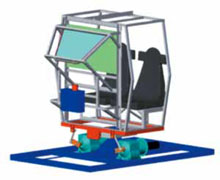
Cook Engineering Services first used Dynamic Designer/Motion to analyze a motion base simulator currently in use in an urban entertainment center in San Francisco. For this project, the client developed the original concept and preliminary design, and produced a working prototype. Cook Engineering Services was asked to bid the dynamic and structural analysis phase of the project. As it turned out, the production company created 3D CAD models of the complete assembly for their use. After winning the bid, Cook was able to calculate the dynamic loads and complete the structural analysis using their finished models, thus saving additional time. When Cook was awarded the motion simulator work, he performed some preliminary hand calculations. "I was satisfied with the results of my efforts; however, I knew that there were some very complex motions that were occurring within the structure, and they were going to be time-consuming to calculate by hand." So Cook approached his CAD distributor about his dynamics needs. "I also went to Mechanical Dynamics’ Design Technologies Division Web site and looked at the Dynamic Designer/Motion product carefully. I downloaded the demo software , ran a couple of test simulations, and was impressed with what I saw," Cook says. With the help of a Mechanical Dynamics application engineer, Cook was able to get the software up and running quickly while in the midst of the complex project. He was soon able to provide the client with a complete analysis of the project including electric motor torques, bearing loads, and vibration analysis of the image projection equipment. Saving Time, Increasing AccuracyCook realizes time savings of more than 50% when calculating dynamics using Dynamic Designer/Motion versus hand calculations. "I can analyze more complex motions with greater accuracy," he says. "Also, the software allows me to make changes to the model quite easily and rerun the simulation while minimizing additional hours for the client." According to Cook, engineers can make mistakes without even knowing it when using a calculator. "Using Dynamic Designer/ Motion, I can change the model, rerun the simulation, and know that I’ve removed the human error part of the equation. My results are consistent, and this raises my confidence in the integrity of the data." Because Cook saves time using Dynamic Designer/ Motion, he can adhere to tight schedule constraints and out-bid competition. "If I can complete a job faster and be more productive and accurate, then I can bid fewer hours than my competition on some jobs, by a factor of two to one." |
|||
 Hands-on engineering is
how Greg Cook describes his craft. Cook is owner and principal of Cook
Engineering Services (Glendale, CA), an engineering consulting firm. With
many years of experience as a machinist and welder/fabricator before
earning his mechanical engineering degree, Greg honed his engineering
skills first at Lockheed, and then at Walt Disney Imagineering as a senior
animation engineer.
Hands-on engineering is
how Greg Cook describes his craft. Cook is owner and principal of Cook
Engineering Services (Glendale, CA), an engineering consulting firm. With
many years of experience as a machinist and welder/fabricator before
earning his mechanical engineering degree, Greg honed his engineering
skills first at Lockheed, and then at Walt Disney Imagineering as a senior
animation engineer. Quote
Quote Evaluation


